

OSCAR shows AHI, leak, flow, and pressure so you can spot common therapy issues at a glance. It’s common to wonder what defines a “good” AHI, what counts as a concerning mask leak, or why your pressure graph suddenly spikes during the night. This guide teaches the correct reading order (Overview → AHI Events → Leak → Flow → Pressure), provides quick checks, and offers tables to help you interpret common patterns.
While you can learn more about what your AHI score means, the typical goal for treated adults is to keep the AHI < 5. It is also crucial to control leaks, as “large” leaks can make your therapy data less reliable and may fragment your sleep. Work with your clinician before changing settings.
What Is OSCAR and How Does It Help You Track CPAP Data?
OSCAR (Open Source CPAP Analysis Reporter) is free software that helps you see exactly what your CPAP machine is doing while you sleep. It converts the raw data from your machine’s SD card into visual charts. According to OSCAR, modern CPAP devices record detailed metrics such as usage hours, Apnea-Hypopnea Index (AHI), leak rates, airflow (flow rate), and delivered pressure. This allows both patients and clinicians to review therapy quality, spot potential issues like leaks, and visualize breathing patterns down to a breath-by-breath level.
The software presents this data in two main views. The “Overview” tab summarizes your long-term trends, showing things like usage and average AHI over weeks or months. The “Daily” view provides the detailed graphs for a single night, including AHI Events, Leak Rate, Flow Rate, and Pressure, all aligned by timestamp. In later sections of this blog, we’ll explain how to interpret AHI, leak rates, flow patterns, and pressure changes in detail, starting with AHI ranges and meanings.
Here is a quick summary of the main data points OSCAR displays:
Metric in OSCAR | What it Represents |
Usage Hours | Total time the machine was running each night |
AHI Events | Count of apneas + hypopneas per hour |
Leak Rate | Unintentional air escaping from the mask or mouth |
Flow Rate | Shape of each breath (inhalation/exhalation pattern) |
Pressure | Delivered pressure and automatic adjustments over time |
How to Open and Read Your OSCAR Charts Step by Step
OSCAR organizes your nightly CPAP data into graphs that must be aligned correctly for a meaningful review. Before you start interpreting metrics like AHI or leaks, it is important to first learn how to open and synchronize your charts to read them in the proper order. According to OSCAR, data from compatible CPAP devices can be imported through the SD card for a full nightly report. If you’re new to therapy, see our CPAP tips for beginners for setup fundamentals.
Here is the basic process for navigating your data:
Import your data. Insert your SD card into the computer and open the OSCAR software. Select your device profile and choose the “Daily View” to see your full nightly report.
Align the time scales. Make sure the time axis across all charts matches. This ensures that AHI Events, Leak Rate, Flow Rate, and Pressure are synchronized so you can see what happened at the same moment.
Follow the reading order. Begin at the “Overview” tab for averages. Then, in the “Daily” view, move through AHI Events, Leak Rate, Flow Rate, and finally Pressure. This is the order we will use throughout the rest of this guide.
Zoom into unusual periods. Focus on any spikes, high leaks, or breathing irregularities. You can zoom into shorter time windows to observe exactly when these events occurred during the night.
Look for repeating patterns. Check multiple nights of data. This helps you see if problems, like a specific type of mask leak, are happening consistently before assuming something is wrong with your setup.
Common Mistakes to Avoid
Here are some common mistakes to avoid when you first start:
Judging your therapy from one single night instead of reviewing patterns over time.
Ignoring the leak data. As highlighted by the American Thoracic Society, large leaks can make event data like AHI or pressure less accurate and disturb sleep quality.
Comparing OSCAR results between different CPAP machine brands without noting that chart layouts or how they define a “large leak” might vary.
Changing your prescribed pressure settings without clinical guidance.
Misinterpreting short, brief spikes or isolated events as consistent therapy issues.
For more navigation tips, the OSCAR community resource “OSCAR — The Guide” available on ApneaBoard provides additional setup visuals and FAQs.
What Does AHI Mean on OSCAR and What Numbers Are Normal?
The Apnea-Hypopnea Index (AHI) represents the average number of apneas (pauses in breathing) and hypopneas (shallow breathing) you experience per hour of sleep. Most clinicians and sleep specialists target an AHI < 5 for adults receiving effective CPAP therapy, as noted by the Cleveland Clinic. OSCAR displays this metric for every night, helping you and your doctor track how well the therapy is controlling these breathing events. For a deeper breakdown of AHI scoring and why it matters for sleep quality, see our AHI Score Guide.
Here are the standard clinical classifications for AHI:
AHI Range (events/hr) | Clinical Classification |
< 5 | Normal (well-treated on CPAP) |
5 – 15 | Mild Sleep Apnea |
15 – 30 | Moderate Sleep Apnea |
> 30 | Severe Sleep Apnea |
Quick Note: Exact categories can vary slightly between clinics and studies.
It is also important to know that AHI values often change from night to night, even in well-controlled patients. As noted in a discussion by CPAP manufacturer ResMed, small increases (for example, from 1.5 to 4.0) are normal. This variation can be caused by changes in sleep position, the mix of sleep stages, or even nasal congestion. You should focus on your multi-night trends in OSCAR rather than worrying about isolated spikes. A slightly higher AHI for one night does not automatically mean your therapy is failing; it just signals a need to check for consistent patterns.
The accuracy of your AHI number can also be affected by mask leaks or the specific algorithms your CPAP machine uses. For instance, a 2025 study by Dr. Celia Vidal et al. published in Respiratory Research found that some CPAP devices exclude events during major leak periods. This can make the reported AHI appear lower than the real number of breathing interruptions you experienced. This means you should always interpret your AHI charts alongside your leak rate graphs to ensure the data is reliable. The next section of this guide explains how leaks can alter accuracy and comfort.
How Do Mask Leaks Affect AHI Accuracy in OSCAR?
Large leaks can distort your AHI readings and fragment your sleep, making your therapy data in OSCAR unreliable. While OSCAR graphs will still show the leak activity, high or sustained leak rates reduce the accuracy of how the machine detects apneas and hypopneas. As shown in a clinical case by the American Thoracic Society, large leaks can cause misleadingly low AHI readings even while symptoms of poor sleep continue. Controlling leaks is essential before you consider adjusting pressure or changing your mask type.
It helps to know there are two types of leaks. Intentional leaks are normal; this is the built-in venting in your mask designed to release exhaled CO₂. Unintentional leaks are the problem. This is air escaping from a poor mask seal, an open mouth, or worn-out mask components. Each CPAP brand uses its own “large leak” threshold. For instance, ResMed devices often flag sustained leaks around 24 L/min as a warning, but you should always verify these values in the context of your specific machine.
Large leaks can significantly reduce event detection accuracy, leading to an underreported AHI in OSCAR. This happens because the machine cannot properly distinguish real breathing events when too much air is escaping the circuit. That same American Thoracic Society case confirms that this data inaccuracy happens during major leaks. Leaks also affect your physical comfort. According to Mayo Clinic Health System, leaks that blow air toward the eyes can cause irritation and dryness, signaling the need to refit or adjust the mask. Leaks do not just disrupt data; they also contribute to poor sleep quality and frustration with therapy.
Here are common symptoms and warning signs that leaks may be an issue:
Dry mouth or throat upon waking
Hissing or whistling sounds near the mask or tubing
Air blowing toward your eyes
Waking up frequently during the night without a clear cause
OSCAR “Leak Rate” chart showing extended peaks well above the baseline
These symptoms indicate that leaks may be affecting both your comfort and data reliability.
The good news is that small changes can often minimize leaks before assuming it is a pressure or mask issue. See our detailed guide on how to reduce CPAP mask leaks for practical adjustments based on your mask type. You can use products from our Mask Liners Collection to help improve the seal and reduce skin irritation. If the leaks are caused by your mouth opening (mouth breathing), applying specialized mouth tape like Hush Strips, CPAPTape, or REMSleep Pro Fabric can resolve the issue. Finally, always maintain seal integrity through proper cleaning using tools like the Snugell Hose Brush Set and the CPAP Cleaning Wipes Collection. Proper hygiene helps prevent facial oils and residue buildup, which can weaken mask seals and worsen leaks over time.
How to Read Flow Rate Charts and Spot Breathing Issues
The Flow Rate chart in OSCAR shows the precise shape, frequency, and rhythm of every breath you take. Generally, rounded and smooth waves represent stable, unobstructed breathing. In contrast, flattened peaks or irregular, jagged shapes can suggest flow limitation, nasal resistance, or brief arousals that disturb your breathing. It is important to know that these patterns can occur naturally throughout the night, especially during REM sleep or when you change your sleeping position. According to OSCAR, flow rate data provides a breath-by-breath view of airflow that can reveal subtle patterns in breathing stability.
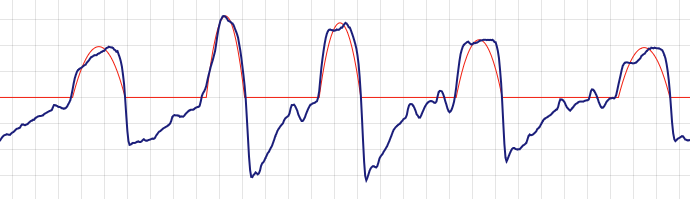
Here is a simple guide to common flow shapes:
Flow Shape in OSCAR | What It Indicates |
Rounded, smooth wave | Normal, steady breathing with balanced inhale and exhale |
Flattened inspiratory peak | Flow limitation (possible nasal resistance or airway narrowing) |
Sawtooth variability | Fragmented breathing or arousals disrupting rhythm |
Abrupt flow drop or irregular gaps | Temporary airflow instability (should be checked alongside the AHI chart) |
Flow limitations may not always show as apnea events, but can still reduce sleep quality if persistent.
Minor changes in the waveform can often be caused by simple issues like nasal congestion, allergies, low humidity in your room, or sleeping in a supine (on your back) position. Before assuming a major therapy issue, try these simple, safe checks to improve airflow consistency:
Ensure your nasal passages are clear.
Verify your humidifier settings are adequate for the room’s air.
Avoid tucking your chin tightly or having poor neck alignment while sleeping.
As noted by Mayo Clinic Health System, even small mask fit or pressure issues can alter comfort and breathing rhythm during sleep.
If you consistently see flow limitations on your chart, it may relate to your mask fit or the design of the nasal interface. Sometimes, switching to a light, high-seal nasal mask can improve airflow comfort and help maintain a more consistent flow pattern. For example, the AirFit P10 Nasal Mask is ideal for stable, low-resistance breathing. Similarly, the F&P Evora Nasal Mask features a lightweight design that supports consistent airflow.
Why Does My CPAP Pressure Keep Changing in OSCAR?
If you are using an Auto-CPAP (APAP) machine, the pressure changes because it automatically adjusts its settings in real time to respond to breathing irregularities. OSCAR graphs show these adjustments, which often appear as “spikes” or gradual climbs in the pressure line throughout the night. It is important to understand that most of these pressure changes are intentional and adaptive; they are designed to keep your airway open and are not usually a sign of a machine fault. For a full overview of how these settings work, visit our CPAP pressure settings guide.
Here are the most common causes of pressure spikes during the night:
Flow limitations: When the machine senses your airflow is restricted (which you might see as flattened peaks on your flow rate chart), it temporarily increases pressure to clear the obstruction.
Apnea or hypopnea events: If the machine detects a pause (apnea) or significant shallowing (hypopnea) in your breathing, it will automatically raise the pressure to reopen the airway.
Mask leaks: Large or fluctuating leaks can confuse the machine’s algorithm. It might misinterpret the air loss as a breathing event and raise the pressure unnecessarily.
Positional apnea: Sleeping on your back (supine) can cause your airway to collapse more easily. The machine will respond by delivering repeated pressure increases to keep it open.
Mouth opening or chin drop: This causes significant air loss from the mouth, triggering pressure adjustments as the device tries to compensate for the lost volume.
Short-term pressure increases are normal and usually mean your Auto-CPAP is responding correctly to events. You should only be concerned if you see persistent, unstable pressure swings, which may signal an unresolved underlying issue usually caused by leaks or sleeping position. Before considering setting adjustments, first review your leak rate charts (as discussed in the previous section) and check your sleeping position. A supportive sleep position can help reduce unnecessary pressure changes. A CPAP-specific pillow, such as the Best in Rest Memory Foam CPAP Pillow with Cooling Gel, helps maintain proper alignment and can prevent your mask from shifting and leaking when you sleep on your side.
If your AHI remains elevated in OSCAR even after you have resolved mask leak and positional issues, your therapy might benefit from a smart, auto-adjusting device. If your therapy data continues to show frequent events despite these adjustments, an Auto-Adjusting CPAP Machine can fine-tune the pressure dynamically based on your specific nightly needs.
What Common Patterns Mean in Your OSCAR Data (Decision Guide)
OSCAR’s charts are most helpful when you look for patterns over time. A single odd night is rarely a concern, but recurring trends can highlight areas to check. The table below helps you interpret what these common patterns might mean and what simple, safe checks you can try. Always review persistent issues with your sleep specialist before changing any prescribed settings.
What You See in OSCAR | Likely Cause | First Things to Try |
AHI stays >10 across several nights | Pressure may be too low, or major leaks are causing inaccurate AHI readings. | First, fix any leaks using Mask Liners or gentle mouth tape, and clean your equipment. If AHI remains high (the goal is <5 per the Cleveland Clinic), review the data with your clinician. Leaks can cause misleading AHI counts (according to the American Thoracic Society). |
Long periods of “large leak” | Mouth opening during sleep or a poor mask seal. | Try Mask Liners to improve the seal, or gentle mouth tape like Hush Strips or REMSleep Pro Fabric. Check your strap tension (not too tight) and see if your mask cushion is worn out. Leaks can cause eye irritation (Mayo Clinic) and disrupt therapy (American Thoracic Society). |
Flattened inspiratory peaks (Flow Rate) | Flow limitation. This can be caused by nasal resistance, allergies, or airway narrowing. | Improve nasal airflow by managing congestion and checking your humidifier settings. Consider a consistent-seal nasal mask like the AirFit P10 or F&P Evora Nasal Mask for stable breathing. |
Frequent pressure spikes | Positional apnea (common when sleeping on the back) or the machine is responding to leaks. | Try sleeping on your side. A CPAP Pillow can help maintain alignment and prevent mask shift. Fix any leaks first, then discuss persistent spikes with your clinician. |
Persistent dry mouth & noisy nights | Mouth leaks and/or low humidity settings. | Increase your humidifier setting one step at a time. Check your hose for tiny leaks. Use Mask Liners or gentle mouth tape to seal leaks. Consistent cleaning with a Snugell Hose Brush Set and CPAP Wipes also helps maintain seal integrity. |
Remember to review these patterns over several nights rather than reacting to a single anomaly. Never change prescription pressure settings on your own. If patterns persist despite good mask fit and cleaning, share your OSCAR reports with your clinician for review.

FAQs and Safety Tips for Reading Your CPAP Data
1. What is a good AHI number on OSCAR?
A “good” AHI on OSCAR is generally considered any number below 5 events per hour for a treated adult. This is the standard treatment target most clinicians aim for, as outlined by the Cleveland Clinic. While it is normal for this number to vary slightly from night to night, if it remains consistently high, it may be a sign of therapy issues or inaccurate readings caused by large leaks. For a complete explanation, see our AHI Score Guide.
2. Why does my AHI fluctuate from night to night?
Minor AHI fluctuations are completely normal and expected. Your AHI can easily change from 1.5 one night to 4.0 the next based on factors like your sleep position (sleeping on your back often increases events), nasal congestion, allergies, or how much REM sleep you had. As noted by ResMed, this variability is fine. You should monitor your multi-night averages to see the real trend rather than focusing on a single night’s number.
3. How can I tell if leaks are affecting my OSCAR data?
Check your Leak Rate chart for long, sustained periods of high leaks (often flagged as “large leaks” > 24 L/min on many ResMed devices). When leaks are this high, your machine cannot accurately detect breathing events, which can cause your AHI to be falsely under-reported. Both the American Thoracic Society and Mayo Clinic confirm that leaks disrupt therapy and data accuracy. Using Mask Liners or gentle mouth tape can help improve seal stability.
4. What do flattened waveforms mean in the Flow Rate chart?
Flattened inspiratory peaks (the top of your inhale breath) on the Flow Rate chart typically indicate “flow limitation.” This means something is causing partial resistance or narrowing in your airway, often from nasal congestion, allergies, or your sleep posture. You can try improving your humidity settings to help with congestion. Sometimes, a high-seal, low-profile nasal mask like the AirFit P10 can help maintain smoother airflow. If you see this pattern consistently, you should discuss it with your clinician.
5. Why does my CPAP pressure keep rising during the night?
If you have an Auto-CPAP (APAP) machine, the pressure is supposed to rise and fall. The machine’s algorithm automatically increases pressure in real-time to respond to detected events like apneas, hypopneas, or flow limitations. These “spikes” mean the machine is doing its job. You can learn more in our CPAP Pressure Settings Guide. If the spikes are constant and related to posture, using a Best in Rest CPAP Pillow can help maintain head and neck alignment to reduce these events.
6. How long should I review my OSCAR data before making changes?
You should track at least 7 to 14 nights of data to identify consistent trends. Reacting to a single bad night is a common mistake; you need to see if an issue (like high leaks or AHI spikes) is a persistent pattern or just a one-time outlier. Most importantly, never change your prescribed pressure settings yourself. Always export your reports and share them with your clinician for review before making any adjustments to your therapy.
7. What’s the difference between leaks, flow limitations, and apneas in OSCAR?
These terms describe three different events. A leak is simply air escaping the circuit (from your mask or mouth). A flow limitation is a change in your breathing shape (a flattened peak), indicating restricted airflow. An apnea is a breathing event, or a partial or full stop in breathing. This is why you should read the charts in sequence (AHI → Leak → Flow → Pressure) to get the full story, as we covered in our How to Read OSCAR Charts Step by Step.
8. Can cleaning affect CPAP data accuracy?
Yes. Facial oils, dust, and residue can build up on your mask cushion, causing the seal to fail and leading to leaks. Buildup in exhalation ports or connections can also interfere with how the machine senses airflow. Routine maintenance with tools like the Snugell CPAP Tube and Mask Cleaning Brush Set and CPAP Wipes ensures a consistent, reliable seal and supports more accurate pressure delivery and OSCAR readings.
9. How can I export or share my OSCAR report with my clinician?
OSCAR has a built-in function that allows you to export your Daily or Overview reports as PDFs for email or upload. For a faster clinical review, it is helpful to highlight the main trends you are seeing, such as average AHI, periods of high leak, and the pressure graph. You can find detailed instructions for exporting on the OSCAR official site.
10. When should I talk to my doctor about OSCAR data?
You should contact your doctor if your AHI consistently stays above 10, if you have large leaks that persist every night despite adjustments, or if the pressure swings feel uncomfortable and wake you up. Even if your numbers look “good,” but you still feel tired, it is crucial to share your reports. Therapy optimization, as referenced by clinical goals from the Cleveland Clinic, always involves professional medical input.
References:
Liobard, H., & Resmed. (2025, March 5). Why does my apnea–hypopnea index (AHI) change? Resmed. https://www.resmed.com/en-us/sleep-health/blog/why-does-my-apnea-hypopnea-index-ahi-change/
OSCAR – Open Source CPAP Analysis reporter. (n.d.). https://www.sleepfiles.com/OSCAR
Professional, C. C. M. (2025, July 25). Apnea-Hypopnea Index (AHI). Cleveland Clinic. https://my.clevelandclinic.org/health/articles/apnea-hypopnea-index-ahi
Christopher Williams, M.D., (2022, July 21). Test your CPAP IQ. Mayo Clinic. https://www.mayoclinichealthsystem.org/hometown-health/speaking-of-health/test-your-cpap-iq
Two head scratchers: What’s causing the leak? (n.d.). https://www.thoracic.org/professionals/clinical-resources/sleep/sleep-fragments/whats-causing-the-leak.php
Vidal, C., Mallet, J., Skinner, S., Gilson, R., Gaubert, O., Prigent, A., Gagnadoux, F., Bourdin, A., Molinari, N., & Jaffuel, D. (2025). Concerns arising from the calculation of the apnea-hypopnea index during CPAP-telemonitoring of patients with obstructive sleep apnea. Respiratory Research, 26(1), 244. https://doi.org/10.1186/s12931-025-03324-4


